Bulistio Complete Kit - Unified Business Directory & Vendor Management
Bulistio is a production-ready, feature-rich Flutter application that delivers both customer and vendor experiences in a single unified codebase. It's a comprehensive Business Listing / Directory Platform where administrators create subscription packages, businesses list their services, and vendors manage their operations efficiently.
What is Bulistio?
Bulistio is a flexible, scalable platform designed for both global and local business directories. The complete kit includes:
- Customer Application: A comprehensive marketplace where users browse, search, and interact with business listings, manage wishlists, orders, and purchases
- Vendor Application: A complete vendor management console with analytics, listing management, product shop, financial tools, and support ticket system
- Unified Architecture: Both apps share common components, theme system, and localization infrastructure while maintaining independent feature modules
Key Platform Capabilities
- Subscription Management: Administrators create and manage subscription packages (monthly, yearly, lifetime, premium, or free plans)
- Featured Listings: Businesses can pay to feature their listings for prominent visibility
- Claim Listing Feature: Business owners can claim existing listings with verification
- Multivendor Shop: Optional shop feature where vendors and admins sell products
- Multi-language & Dark Mode: Full support for English, Arabic (RTL), Spanish and dark themes
- Analytics & Dashboard: Vendors access real-time analytics and business metrics
- Messaging System: Integrated messaging for inquiries with conversation tracking
Project Overview
Architecture Overview
The Bulistio Complete Kit uses a unified architecture with dual entry points:
- main.dart: Entry point that launches a selector screen
- Selector Screen (selector.dart): Allows users to choose between Customer or Vendor app
- lib/customer/: All customer-facing features (browsing, purchases, wishlists)
- lib/vendor/: All vendor management features (listings, products, analytics)
- Shared Components (lib/common/): Reusable UI widgets and utilities both apps use
Technology Stack
- Framework: Flutter 3.11.4+ for cross-platform Android & iOS development
- State Management: Provider pattern for reactive state across modules
- Localization: Flutter i18n with English, Arabic (RTL), and Spanish support
- Data Storage: SharedPreferences for persisting theme, locale, and preferences
- Charts & Analytics: fl_chart and Syncfusion charts for vendor dashboard
- Rich Text: flutter_quill for descriptions with formatted text support
- File Handling: image_picker and file_picker for media uploads
How Both Apps Interact
The customer and vendor apps are independent experiences but share:
- Common UI widget library in
lib/common/ - Shared theming system with light/dark mode support
- Localization infrastructure for multi-language support
- Core assets (logos, icons, images) in
assets/ - Same dependencies defined in
pubspec.yaml
Folder Structure
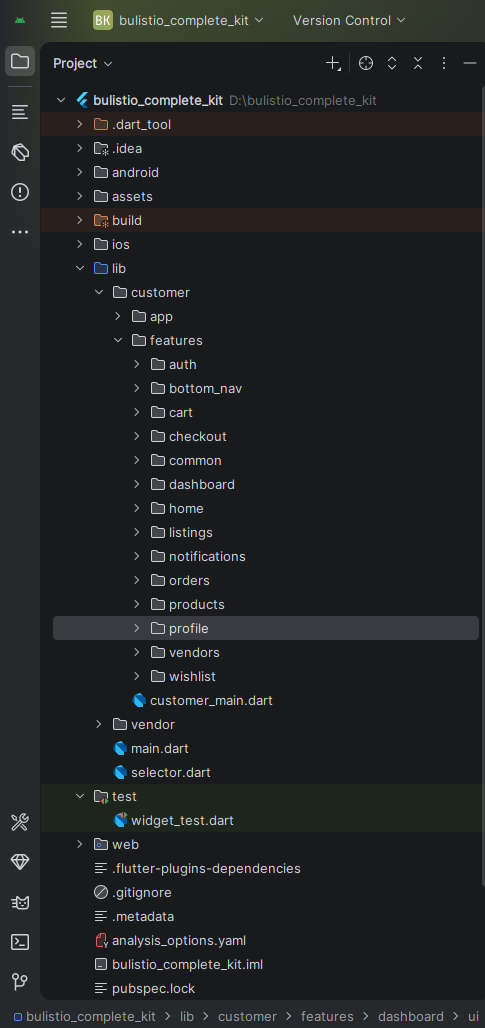
All logical and UI changes should follow the library (lib) folder structure. The unified project structure:
bulistio_complete_kit/
├── lib/
│   ├── main.dart                 # App entry point
│   ├── selector.dart             # Choose between customer/vendor
│   ├── customer/                 # Customer App
│   │   ├── customer_main.dart
│   │   ├── app/
│   │   │   ├── app.dart
│   │   │   ├── app_colors.dart
│   │   │   ├── assets_path.dart
│   │   │   └── app_text_styles.dart
│   │   └── features/
│   │       ├── auth/
│   │       ├── home/
│   │       ├── listings/
│   │       ├── products/
│   │       ├── cart/
│   │       ├── checkout/
│   │       ├── orders/
│   │       ├── wishlist/
│   │       └── profile/
│   │
│   ├── vendor/                   # Vendor App
│   │   ├── vendor_main.dart
│   │   ├── app/
│   │   │   ├── app.dart
│   │   │   ├── app_colors.dart
│   │   │   ├── theme_provider.dart
│   │   │   └── locale_provider.dart
│   │   └── features/
│   │       ├── auth/
│   │       ├── dashboard/
│   │       ├── listings_management/
│   │       ├── shop_management/
│   │       ├── messages/
│   │       ├── buy_plan/
│   │       ├── payment_logs/
│   │       ├── withdraw/
│   │       ├── support_tickets/
│   │       └── nav_appbar/
│   │
│   └── common/                   # Shared utilities & widgets
│       └── ui/widgets/
│
├── assets/
│   ├── fonts/
│   ├── icons/
│   └── images/
│
├── android/
├── ios/
├── pubspec.yaml
└── README.md
Folder Design Principles
- Feature-First Architecture: Organized by features, not layers. Easier to scale and maintain.
- lib/common/: Shared widgets and utilities used by both customer and vendor apps
- Independent Modules: Customer and vendor code are separate, allowing independent deployment
- Centralized Assets: All images, icons, and fonts are in
assets/
Customer App
The Customer App is a comprehensive Business Listing / Directory Platform where users can discover, search, and interact with business listings.
Customer App Overview
- Browse & Search: Discover businesses across categories and locations with advanced filtering
- Listings Details: View complete business information including hours, features, FAQs
- Wishlist Management: Save favorite listings for later
- Shop & Cart: Browse products, add to cart, manage quantities
- Checkout & Payments: Complete purchase flow with order tracking
- Orders Management: View current and past orders with details
- User Profile: Manage account, addresses, order history
- Dark Mode & Multi-Language: Full dark/light theme and language support
Customer App Screens
Authentication (7 screens): Splash, Login, Register, OTP, Password Recovery, Reset, Change Password
Browse & Search (2 screens): Listings List, Listings Details
Products (2 screens): All Products, Product Details
Shopping (3 screens): Shopping Cart, Checkout, Checkout Success
Orders (2 screens): Orders List, Order Details
Other (3 screens): Wishlist, Vendors, User Profile
Vendor App
The Vendor App is a production-ready business management console. Vendors can manage listings, products, orders, payments, and analytics—all from one dashboard.
Vendor App Overview
- Dashboard & Analytics: Real-time business metrics, monthly charts, visitor tracking
- Listing Management: Create/edit listings with multi-language, rich text, business hours, FAQs
- Shop Management: Manage digital and physical products, orders, custom forms
- Financial Control: Payment history, withdrawal requests, balance tracking
- Messaging System: Respond to customer inquiries about listings and products
- Support Tickets: Customer support system for issue resolution
- Subscription Plans: Browse and purchase upgrade plans
- Dark Mode & Multi-Language: Full language and theme switching support
Vendor App Screens (37 Total)
Authentication (5): Splash, Login, Signup, Edit Profile, Change Password
Dashboard (1): Analytics with charts, summary tiles, package info
Listings Management (7): Add/Manage Listings, Plugins, Business Hours, Social Links, Features, FAQs
Shop Management (10): Products, Orders, Forms, Digital/Physical Product Forms, Order Details
Messages (3): Listing Messages, Product Messages, Message Details
Plans & Financial (6): Buy Plans, Payment Logs, Invoice, Withdraw Balance, Withdrawal Requests
Support (3): Support Tickets, Add Ticket, Ticket Details
Navigation (2): Email Management, App Home with Navigation
Requirements
To develop, build, or modify the Bulistio Complete Kit, you'll need the following:
Required IDEs
- Android Studio: https://developer.android.com/studio
- VS Code: https://code.visualstudio.com/download
- IntelliJ IDEA: Community Edition with Flutter support
Flutter & Dart Setup
- Minimum Flutter Version: 3.30.0 (current: 3.11.4+)
- Installation Guide: https://docs.flutter.dev/get-started/install
- IDE Plugins: Install Flutter and Dart plugins
Setup Videos
Install Flutter on Windows
Install Flutter on Mac
Installation
Step-by-Step Installation
- Extract the
bulistio_complete_kit.zipfile - Open in Android Studio or VS Code
- Open
pubspec.yamland runpub get(or click "Get Packages") - Verify Flutter 3.30.0+:
flutter --version - Connect device/emulator
- Click Run or execute
flutter run
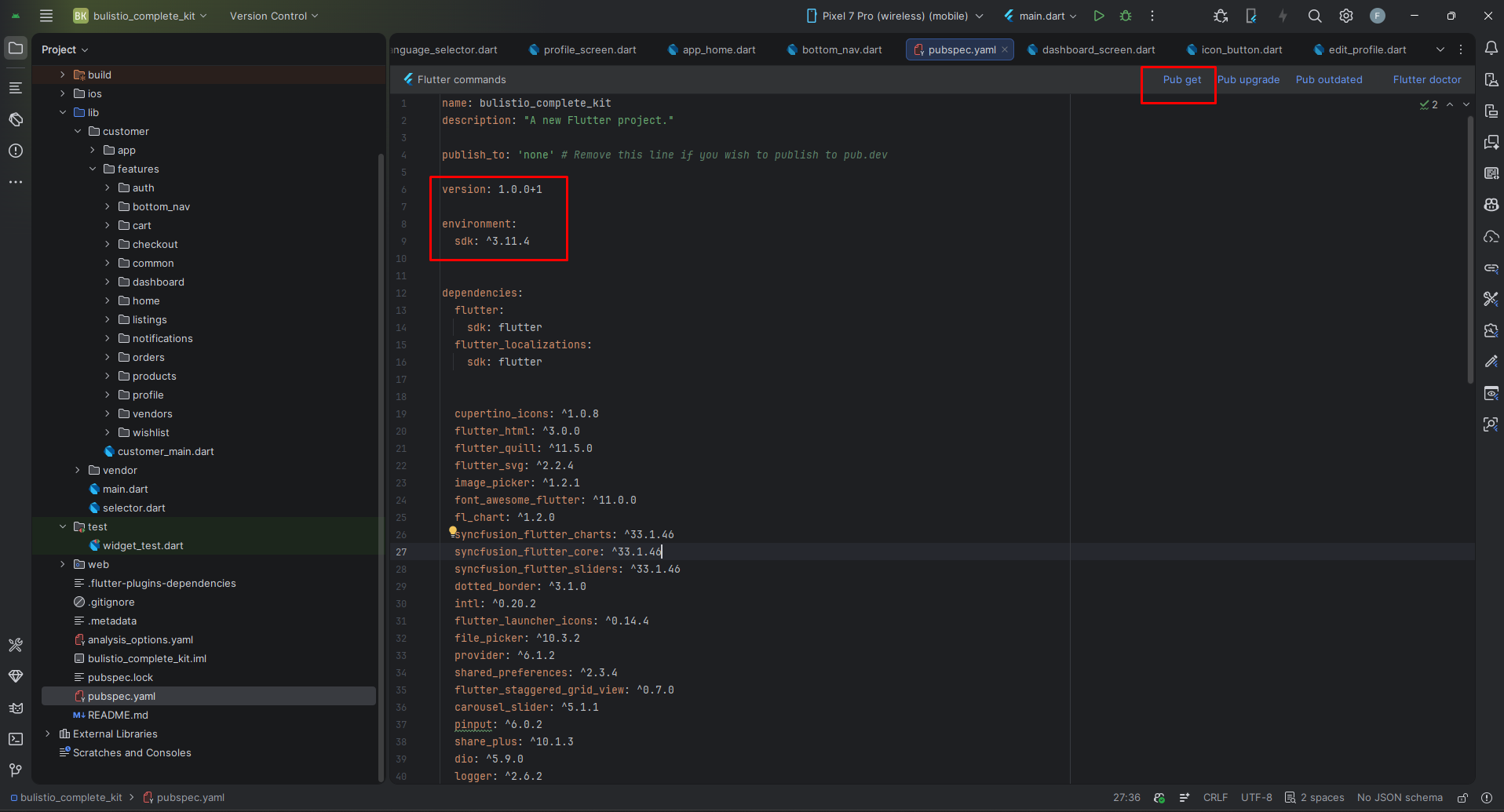
Flutter Packages
Core UI: flutter_svg, font_awesome_flutter, carousel_slider, flutter_staggered_grid_view, dotted_border
Localization: flutter_localizations, intl, flutter_quill, flutter_html
State Management: provider, shared_preferences
Files & Images: image_picker, file_picker, cached_network_image
Charts: fl_chart, syncfusion_flutter_charts, syncfusion_flutter_sliders
Utilities: dio, logger, share_plus, flutter_launcher_icons
Setup Application
1. Change App Theme & Colors
For Customer App: Edit lib/customer/app/app_colors.dart
For Vendor App: Edit lib/vendor/app/app_colors.dart
2. Change App Logo & Assets
Edit lib/[customer|vendor]/app/assets_path.dart and update asset references
3. Change App Name
Android: Edit android/app/src/main/AndroidManifest.xml
iOS: Edit ios/Runner/Info.plist
4. Change App Icons
Update launcher icons in the project directories or use flutter_launcher_icons:
5. Customize Text Styles
Edit lib/[customer|vendor]/app/app_text_styles.dart for all typography customization
Build & Run
Running the Application
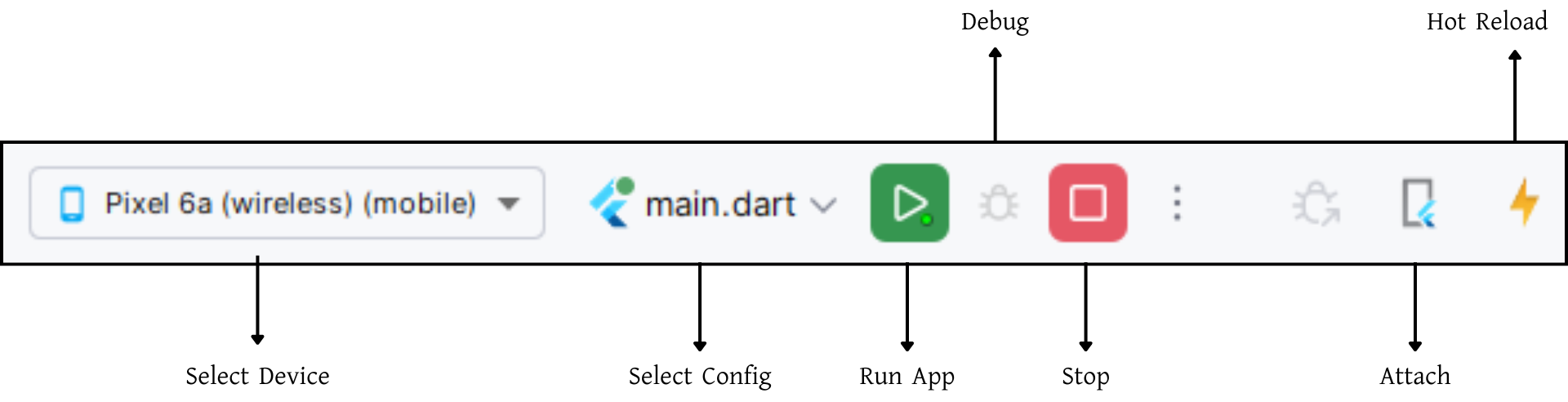
Using IDE: Select device from dropdown, click Run button
Using Terminal:
Debugging Tips:
- Hot Reload: Press R in terminal to reload changes
- Hot Restart: Press Shift+R to fully restart
- Verbose Logging: Use
flutter run -vfor detailed output - Device Logs: Use
flutter logs
Build & Publish
Android Release Build
For Play Store (recommended):
Or build standalone APK:
iOS Release Build
Signing the App for Play Store
Step 1: Generate Signing Key
Step 2: Create key.properties
Create android/key.properties:
Step 3: Configure Gradle
Update android/app/build.gradle.kts with signing configuration
Publishing
Google Play Store: https://flutter.dev/docs/deployment/android
Apple App Store: https://flutter.dev/docs/deployment/ios
Build Checklist
- ✓ Update version in pubspec.yaml
- ✓ Test release build on actual devices
- ✓ Update privacy policy and terms
- ✓ Create app store screenshots
- ✓ Write compelling description
- ✓ Test dark mode thoroughly
- ✓ Verify language support
- ✓ Test RTL rendering
Support & Resources
Getting Help
📧 For support, questions, or customization requests, contact us via email.
Useful Resources
- Flutter Documentation: https://flutter.dev/docs
- Dart Documentation: https://dart.dev/guides
- Pub Packages: https://pub.dev
Troubleshooting
- Build Issues: Run
flutter cleanthenflutter pub get - Plugin Errors: Update iOS pods with
cd ios && pod update && cd .. - Device Connection: Use
adb devicesto verify (Android) - Flutter Version: Update with
flutter upgrade