CarList Complete UI Documentation
This documentation is updated from the current Flutter project in carlist_complete_ui. The app is a single codebase with a selector entry and two modules: customer and vendor.
The main launcher starts at lib/main.dart, opens lib/selector.dart, and routes users into either Carlist (customer) or CarlistVendor (vendor).
Entry Points
lib/main.dart- default launcher with selector.lib/selector.dart- choose Customer or Vendor flow.lib/customer/main.dart- launch customer module directly.lib/vendor/main.dart- launch vendor module directly.
Scope of this document
- Real folder structure and module architecture from current source code.
- Current screen inventory for customer and vendor modules.
- Actual package list from
pubspec.yaml. - Setup, run, and release steps for this combined Flutter project.
Project Structure
The complete app uses one Flutter root and shared assets. Business logic and UI are split under lib/customer and lib/vendor.
carlist_complete_ui/
|- android/
|- ios/
|- assets/
|  |- fonts/Inter/
|  |- icons/
|  \- images/
|- lib/
|  |- main.dart
|  |- selector.dart
|  |- customer/
|  |  |- main.dart
|  |  |- app/
|  |  \- features/
|  \- vendor/
|     |- main.dart
|     |- app/
|     |- core/navigation/app_routes.dart
|     \- features/
|- pubspec.yaml
|- analysis_options.yaml
\- test/
Shared project level
- One dependency file:
pubspec.yaml. - One asset system under
assets/. - One Android and iOS platform setup for both modules.
Selector flow
Selectorsends customer users toCarlist.- Vendor route initializes
ThemeProviderandLocaleProviderbefore loadingCarlistVendor. - Selector design and labels are defined directly in
lib/selector.dart.
Customer module
lib/customer/appcontains colors, theme, assets, and app shell.lib/customer/featurescontains auth, listings, products, cart, checkout, orders, support, profile, and more.- Customer app starts at splash via
Carlist.
Vendor module
lib/vendor/appmanages theme mode and locale persistence.lib/vendor/core/navigation/app_routes.dartdefines vendor routes.lib/vendor/featuresincludes dashboard, cars, plans, payment logs, and support tickets.
Structure
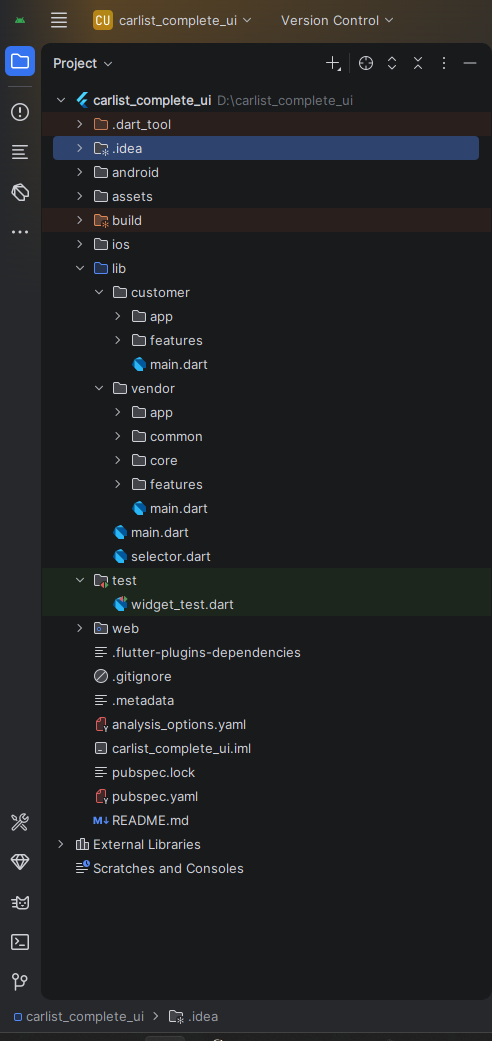
Customer Module
The customer app shell is lib/customer/app/carlist.dart. It uses a light theme and launches the customer splash screen first.
Feature Folders
- auth, bottom_nav, cart, categories, checkout, home, listings, notifications, orders, products, profile, support, vendors, wishlsits.
- Note: the current folder name in source is
wishlsits(as-is in project).
Customer Screens (Total: 28)
AUTH (7)
- Change Password
- Forget Password
- Login
- OTP
- Register
- Reset Password
- Splash
NAVIGATION & HOME (3)
- Bottom Navigation
- Home
- Notifications
LISTINGS & CATALOG (6)
- Cars Listings
- Listing Details
- Categories
- Products
- Product Details
- Wishlist
PURCHASE FLOW (5)
- Cart
- Checkout
- Order Success
- Orders
- Order Details
ACCOUNT & SUPPORT (7)
- Dashboard
- Edit Profile
- Profile
- Support Tickets
- Ticket Details
- Vendors
- Vendor Details
Customer Branding Reference
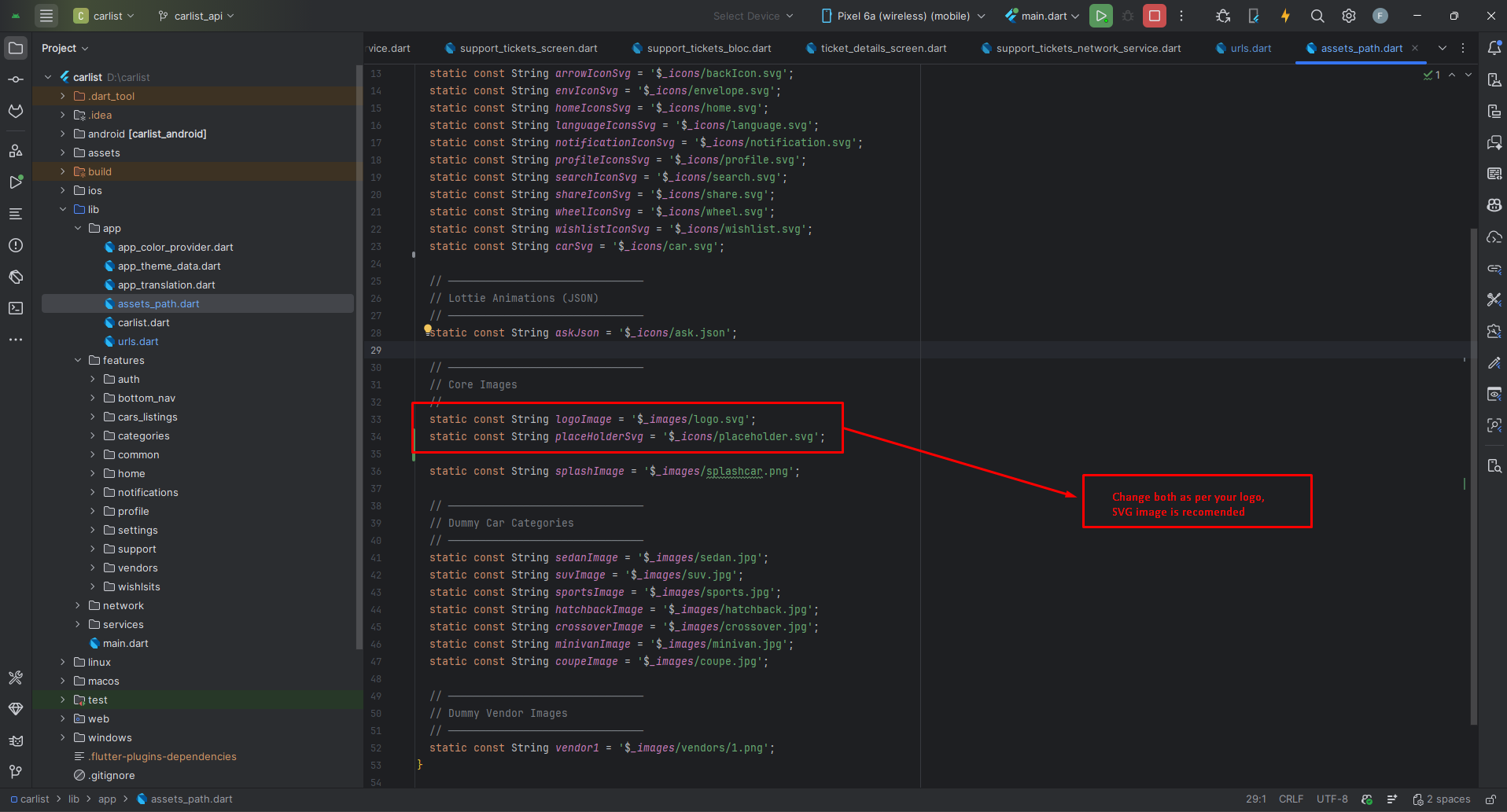
Vendor Module
The vendor app shell is lib/vendor/app/app.dart. It supports light/dark mode, locale switching, and RTL handling through providers and saved preferences.
Vendor Highlights
- Theme persistence with
ThemeProvider. - Locale and RTL support with
LocaleProvider. - Named route navigation through
AppRoutes.onGenerateRoute. - Business flows for cars, plans, payments, and support tickets.
Vendor Screens (Total: 15)
AUTH (5)
- Change Password
- Edit Profile
- Login
- Signup
- Splash
CORE BUSINESS (7)
- Dashboard
- App Home
- Add Car
- Manage Cars
- Buy Plan
- Plan Payment
- Payment Logs
SUPPORT (3)
- All Support Tickets
- Add Support Ticket
- Support Ticket Details
Requirements
Use current Flutter SDK compatible with Dart ^3.11.4 (as defined in pubspec.yaml).
- Android Studio or VS Code with Flutter and Dart plugins.
- Android SDK and/or Xcode setup depending on your target platform.
- Connected device or emulator/simulator.
- Android Studio: https://developer.android.com/studio
- VS Code: https://code.visualstudio.com/download
- Flutter setup guide: https://docs.flutter.dev/get-started/install
Installation
- Open the Flutter root folder:
carlist_complete_ui. - Run dependency install from project root:
Launch Options
Selector flow
Customer only
Vendor only
Flutter Packages (Current)
SDK dependencies
flutter (sdk)
flutter_localizations (sdk)
Direct dependencies from pubspec.yaml
flutter_html: ^3.0.0
flutter_quill: ^11.5.0
flutter_svg: ^2.2.3
image_picker: ^1.2.1
font_awesome_flutter: ^10.12.0
fl_chart: ^1.0.0
syncfusion_flutter_charts: ^30.1.42
syncfusion_flutter_core: ^30.1.42
syncfusion_flutter_sliders: ^30.1.42
dotted_border: ^3.1.0
intl: ^0.20.2
flutter_launcher_icons: ^0.14.4
file_picker: ^10.3.2
provider: ^6.1.2
shared_preferences: ^2.3.4
pinput: ^6.0.1
carousel_slider: ^5.1.1
lottie: ^3.3.2
flutter_staggered_grid_view: ^0.7.0
Setup Application
App Name
Android: edit android/app/src/main/AndroidManifest.xml and update android:label.
iOS: edit ios/Runner/Info.plist and update CFBundleName/CFBundleDisplayName.
Launcher Icons
- Replace icon assets in
assets/icons/. - Current icon config is already in
pubspec.yaml. - Regenerate icons:
Brand Assets and Theme
- Selector branding:
lib/selector.dart. - Customer theme and colors:
lib/customer/app/app_theme_data.dart,lib/customer/app/app_colors.dart. - Vendor theme and dark mode:
lib/vendor/app/theme_data.dart,lib/vendor/app/theme_provider.dart. - Vendor language and RTL:
lib/vendor/app/locale_provider.dart.
Build & Run App
- Select emulator/device and run any target entry point.
- Use selector launch for QA across both modules.
- Use module-specific launch targets for focused development.
Run selector
Run customer
Run vendor
Vendor run reference
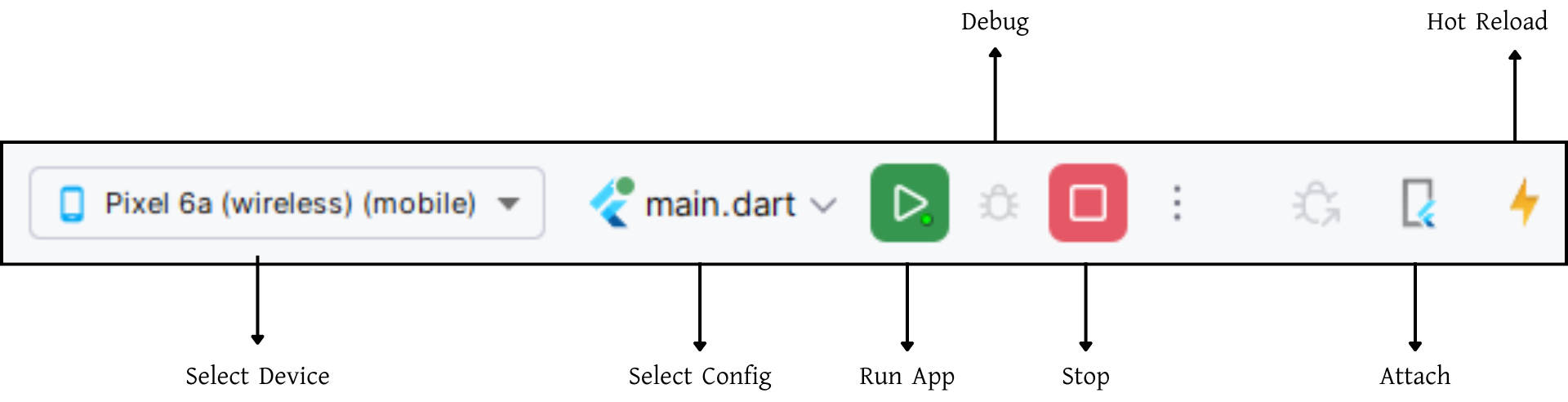
Build Release & Publish App
Build release artifacts from the Flutter project root after app name, package identifiers, icons, and signing are configured.
Android APK
Android App Bundle (Play Store)
Split APK by ABI
Signing key
Then configure release signing in Android gradle files and follow official publishing guides:
Support
For product support and customization requests, use your package provider support channel. This page documents the current combined CarList Flutter codebase.