Evento Organizer Event Management App
Evento Organizer is a production-ready, fully functional, and API-integrated mobile application built with
Flutter for event organizers (vendor side). It is the organizer companion app for the Evento ecosystem,
connecting to the backend at https://your-domain.com. It ships with comprehensive event
management features, clean architecture, and integrated tools (auth, event creation, ticket management,
bookings, income analytics, withdrawals, support tickets, multi-language, dark mode) so organizers can
manage their events efficiently on both Android and iOS.
What you get out of the box
- Organizer dashboard with income analytics, revenue charts, and booking overview.
- Event management: Create, edit, and manage both online and venue events with multi-language support, rich text descriptions, gallery images, and location maps.
- Ticket management: Add/edit ticket types, configure pricing (free/paid/variations), early-bird discounts, seat mapping, and ticket slot configuration.
- Booking management: View all, pending, completed, and rejected bookings with detailed customer information, variation breakdowns, and booking reports.
- Financial tools: Income analytics with monthly charts, withdrawal requests, transaction history, and balance tracking.
- Support system: Create and manage support tickets with full conversation threads.
- Modern features: Dark mode, RTL support (Arabic), multi-language, responsive layouts.
Architecture at a glance (feature-first)
lib/app: application layer and cross-cutting concerns- Core app files:
app_colors.dart,app_theme_data.dart,assets_path.dart,app_routes.dart,app_text_styles.dart,urls.dart
- Core app files:
lib/features: domain modules with clear boundariesauth/: organizer login, signup, profile editing, change passworddashboard/: analytics, income charts, booking statsevent_management/: add/edit online & venue events, event listing, ticket management, seat mapping, ticket settingsevent_bookings/: all bookings, pending/completed/rejected, booking details, booking reportsincome/: monthly income analytics with chartswithdraw/: balance tracking, withdrawal requests, historytransactions/: complete transaction history with paginationsupport_tickets/: ticket creation, listing, and conversation threadsnav_appbar/: main navigation shell, drawer, bottom navcommon/: reusable UI components and widgets
lib/services: API service layerapi_client.dart: Dio-based HTTP client with auth interceptor, 401 auto-logout- Domain services:
auth_service.dart,event_management_service.dart,withdraw_service.dart, etc.
lib/utils: utility classesapp_logger.dart,number_formatter.dart
Key integrations
- State management with
providerallChangeNotifierproviders registered globally inapp.dart. - Networking with
dioauto-injectsAuthorization: Bearertoken andAccept-Languageheader on every request. - Multi-language support with RTL for Arabic (direction driven by API language data).
- Dark mode with full light/dark theme via
AppThemeData. - Rich text editing with
flutter_quillfor event descriptions. - Maps & location using
google_maps_flutterfor venue event location picking. - Image handling with
image_pickerandfile_pickerfor thumbnails and gallery uploads. - Charts with
fl_chartandsyncfusion_flutter_chartsfor income analytics. - Compact number formatting (1M/1B/1T) for large financial figures.
Branding and theming
- Primary teal color:
#008585, accent:#00b1b6defined inAppColors. - Full light/dark theme in
AppThemeData. Font family: Inter. - Dark mode support with automatic theme switching based on user preference.
- Supporting colors and accent tones can be customized in
lib/app/app_colors.dartandlib/app/theme_data.dart.
The result is a maintainable, scalable codebase that adheres to Flutter best practices. You can customize typography, colors, layouts, assets, and module-level behavior without fighting the structure making it faster to ship features and iterate.
Folder Structure
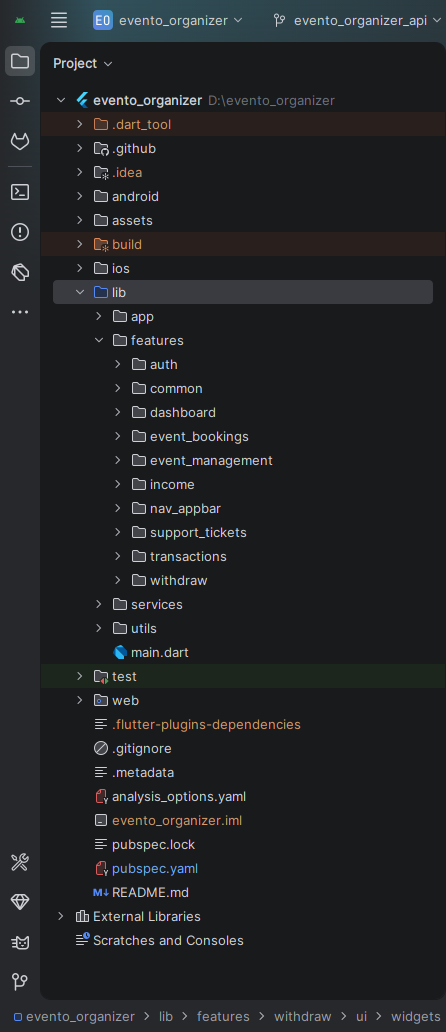
All you need to follow the lib (Library) Folder for any logical and UI changes in this project.
lib
├── app
│   ├── app.dart
│   ├── app_colors.dart
│   ├── app_routes.dart
│   ├── app_text_styles.dart
│   ├── assets_path.dart
│   ├── theme_data.dart
│   └── urls.dart
├── features
│   ├── auth
│   │   ├── data/models
│   │   ├── providers
│   │   └── ui/screens
│   ├── dashboard
│   │   ├── data/models
│   │   ├── providers
│   │   └── ui/screens
│   ├── event_management
│   │   ├── data/models
│   │   ├── providers
│   │   └── ui/screens & widgets
│   ├── event_bookings
│   │   ├── data/models
│   │   ├── providers
│   │   └── ui/screens & widgets
│   ├── income
│   │   ├── data/models
│   │   ├── providers
│   │   └── ui/screens
│   ├── withdraw
│   │   ├── data/models
│   │   ├── providers
│   │   └── ui/screens & widgets
│   ├── transactions
│   │   ├── data/models
│   │   ├── providers
│   │   └── ui/screens & widgets
│   ├── support_tickets
│   │   ├── data/models
│   │   ├── providers
│   │   └── ui/screens & widgets
│   ├── nav_appbar
│   │   └── ui/screens
│   └── common
│       └── ui/widgets
├── services
│   ├── api_client.dart
│   ├── auth_service.dart
│   ├── event_management_service.dart
│   ├── withdraw_service.dart
│   └── ...other services
└── utils
    ├── app_logger.dart
    └── number_formatter.dart
Screens
Organizer App Screens (35 Total):
Authentication (5 screens)
1. Splash Screen
2. Login Screen
3. Signup Screen
4. Edit Profile Screen
5. Change Password Screen
Dashboard (1 screen)
6. Dashboard Screen (income analytics, booking stats, revenue chart)
Event Management (14 screens)
7. All Events Screen (combined list)
8. Online Events Screen
9. Venue Events Screen
10. Choose Event Type Screen
11. Add Online Event Screen
12. Add Venue Event Screen
13. Edit Online Event Screen
14. Edit Venue Event Screen
15. Tickets Screen (ticket list per event)
16. Add Tickets Screen
17. Edit Ticket Screen
18. Ticket Settings Screen
19. Seat Mapping Screen
20. Event Card Widget
Event Bookings (6 screens)
21. All Bookings Screen
22. Pending Bookings Screen
23. Completed Bookings Screen
24. Rejected Bookings Screen
25. Booking Details Screen
26. Booking Report Screen
Financial (3 screens)
27. Monthly Income Screen (charts)
28. Withdraw / Balance Screen
29. Withdrawal Request Screen
30. Transactions Screen
Support (3 screens)
31. All Support Tickets Screen
32. Add Support Ticket Screen
33. Support Ticket Details / Conversation Screen
Navigation (2 screens)
34. App Home (main shell with bottom nav / drawer)
35. Organizer Drawer Widget
Requirements
Download and install any one of these IDEs (Android Studio, VS Code) on your computer.
- Android Studio: https://developer.android.com/studio
- VS Code: https://code.visualstudio.com/download
Set up Flutter and Dart SDK on your computer if you want to modify the source code.
- Flutter installation guide: https://docs.flutter.dev/get-started/install
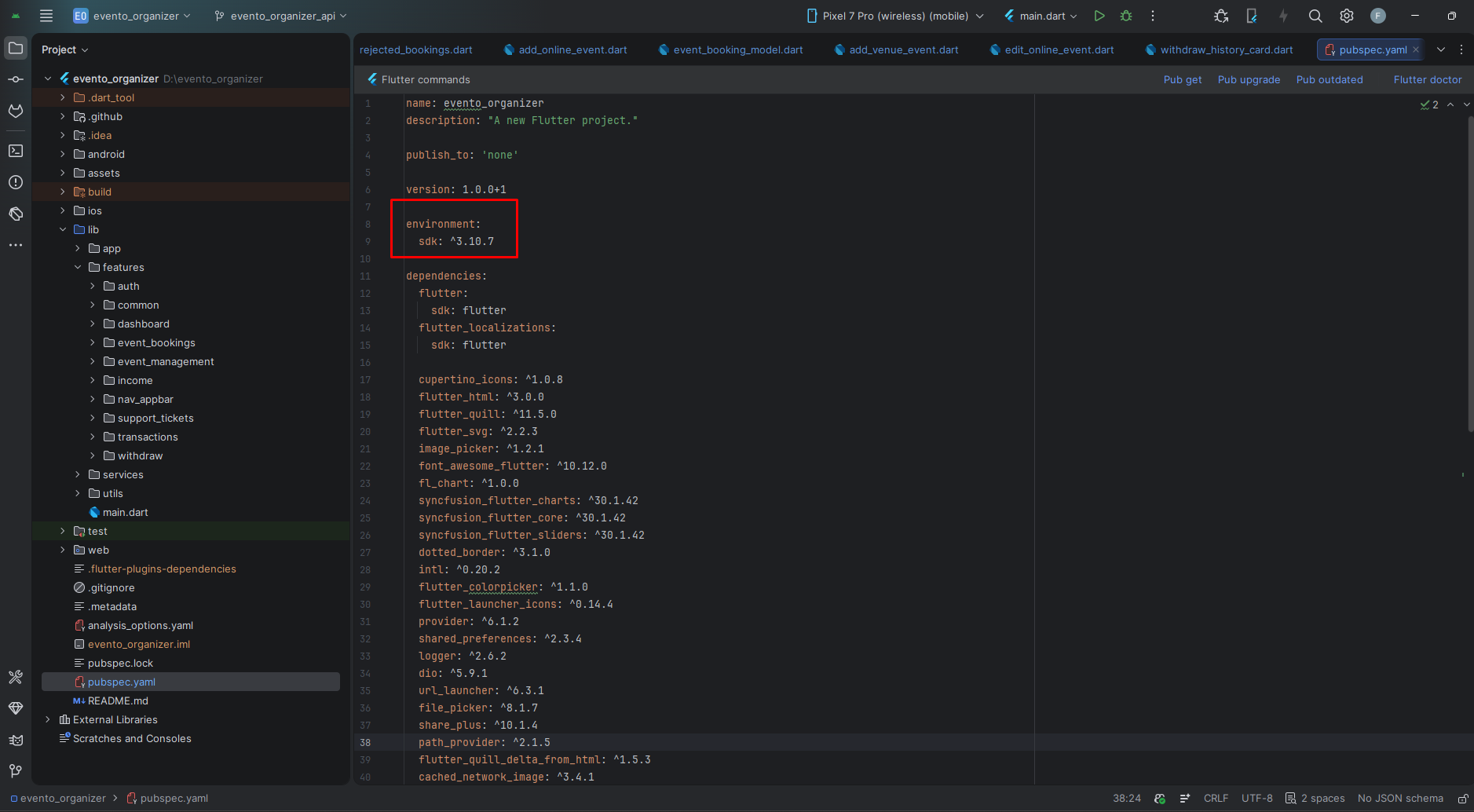
- Minimum Flutter version: 3.30.0
Must install Flutter and Dart plugins in your IDE.
Install Flutter on Windows
Install Flutter on Mac
Installation
After downloading the file from CodeCanyon you will get a zip file. Extracting it gives you a Documentation folder and the app source zip:
- Unzip the source and open it in your IDE.
- Find
pubspec.yamland run pub get (top-right in Android Studio) or runflutter pub getin terminal. - Make sure you are using Flutter version 3.30.0 or higher.
- Open an emulator or connect a real device, then click Run.
Flutter Packages
Core UI & Design
cupertino_icons >> iOS-style icon set
flutter_svg >> Render SVG assets
font_awesome_flutter >> Font Awesome icon library
dotted_border >> Dotted/dashed border widget for image upload areas
flutter_colorpicker >> Color picker widget (used in seat mapping)
cached_network_image >> Network images with caching
Charts & Analytics
fl_chart >> Customizable charts for income analytics
syncfusion_flutter_charts >> Advanced charts (Syncfusion)
syncfusion_flutter_sliders >> Range sliders
syncfusion_flutter_core >> Core Syncfusion utilities
Localization & Text
flutter_localizations >> Built-in Flutter localizations (en, ar, es)
intl >> Date/number formatting and i18n utilities
flutter_quill >> Rich text editor for event descriptions
flutter_quill_delta_from_html >> Convert HTML to Quill delta
flutter_html >> Render HTML content
State Management
provider >> Officially recommended state management (ChangeNotifier)
Networking & Data
dio >> Powerful HTTP client with interceptors (auth token injection)
shared_preferences >> Persistent key-value storage (token, locale)
logger >> Pretty logging via AppLogger
url_launcher >> Launch URLs in external apps
device_info_plus >> Device information
File & Image Handling
image_picker >> Capture or select images (thumbnails, gallery)
file_picker >> Pick files from device storage
share_plus >> Share content from the app
path_provider >> Access device file system paths
Note: This app does NOT use Firebase or push notifications.
Setup Application
Change App Name
Android
- Open
<project>/android/app/src/main/AndroidManifest.xml - Update the
android:labelvalue inside the<application>tag:
<application
    android:label="Evento Organizer"
    android:icon="@mipmap/ic_launcher">
</application>
iOS
- Open
<project>/ios/Runner/Info.plist - Change
CFBundleName:
<key>CFBundleName</key>
<string>Evento Organizer</string>
Reinstall after rename
- Uninstall the previously installed app from the device/emulator, then rebuild and run.
Change App Launcher Icons
- Update the
flutter_launcher_iconsconfig inpubspec.yaml:
flutter_launcher_icons:
  android: true
  ios: true
  image_path: "assets/icons/icon.png"
  adaptive_icon_foreground: "assets/icons/icon.png"
  adaptive_icon_background: "assets/icons/bg.png"
- Place your icons at
assets/icons/icon.png(10241024 recommended) - Generate icons:
- Rebuild the app. Clear build caches if icons do not update.
Change API URL
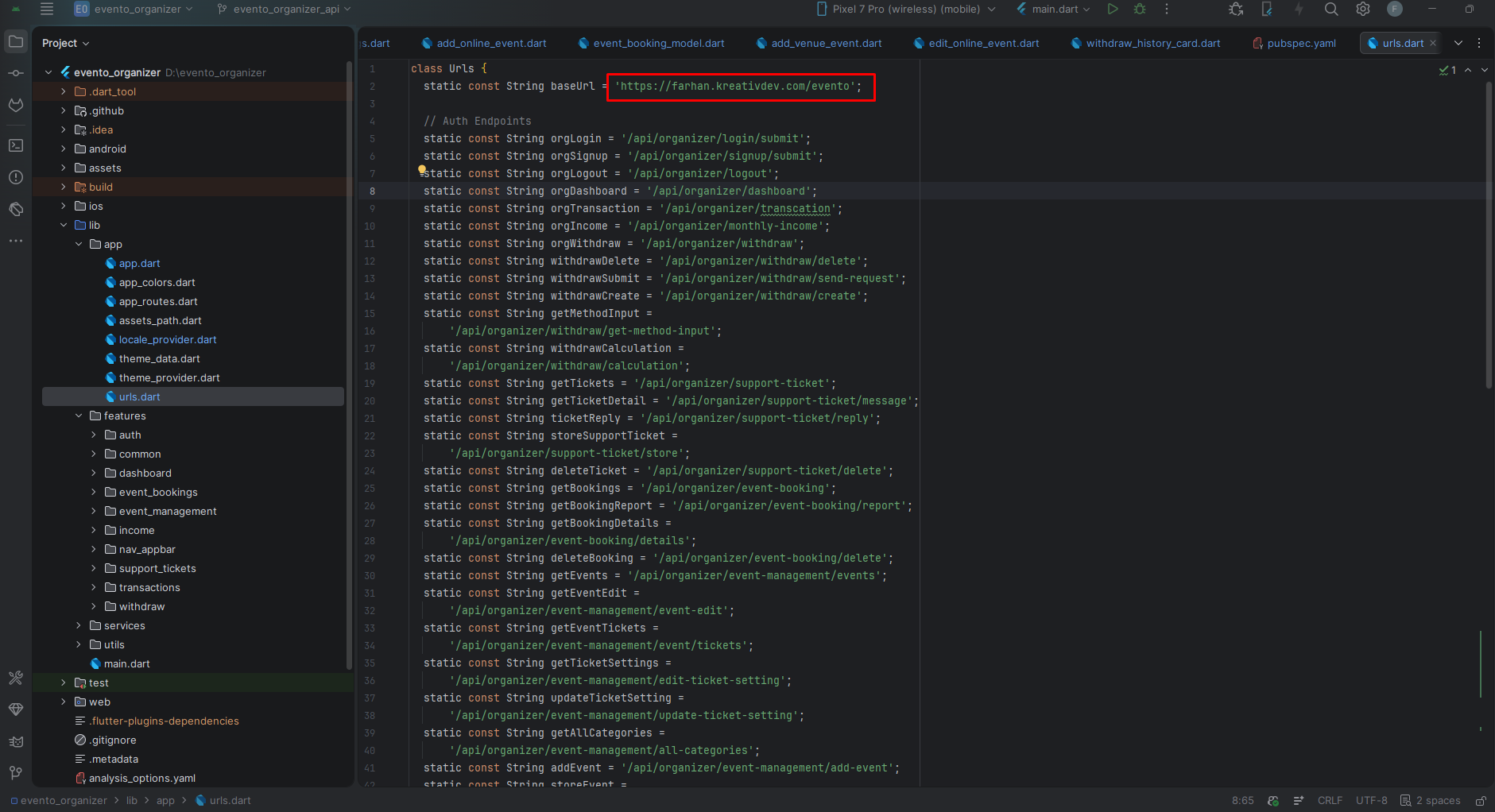
- Open
lib/app/urls.dart - Update the base URL constant to your server URL (no trailing slash):
class Urls {
  static const String _baseUrl = 'https://your-domain.com/evento'; //  change this to your domain + install directory
  static const String _apiBaseUrl = '$_baseUrl/api'; //  if your API prefix is different (e.g. /api/v2), change 'api' here

  // Auth
  static const String login      = '$_apiBaseUrl/organizer/auth/login';
  static const String register   = '$_apiBaseUrl/organizer/auth/register';

  // Events
  static const String getEvents  = '$_apiBaseUrl/organizer/event-management/events';
  static const String addEvent   = '$_apiBaseUrl/organizer/event-management/event/store';

  // Bookings
  static const String getBookings = '$_apiBaseUrl/organizer/event-booking';

  // Transactions
  static const String getTransactions = '$_apiBaseUrl/organizer/transcation';

  // Withdraw
  static const String getWithdrawData = '$_apiBaseUrl/organizer/withdraw';

  // Support Tickets
  static const String getSupportTickets = '$_apiBaseUrl/organizer/support-ticket';

  // ... other endpoints
}
- Do not add a trailing
/to_baseUrl. - If your backend is installed in a different directory (e.g.
/evento2,/app, or at the root), update_baseUrlto match:// Backend at root domain static const String _baseUrl = 'https://your-domain.com'; // Backend in a subdirectory static const String _baseUrl = 'https://your-domain.com/evento'; // Backend on a subdomain static const String _baseUrl = 'https://api.your-domain.com';
- If the API prefix changes (e.g.
/api/v2instead of/api), update_apiBaseUrlaccordingly:static const String _apiBaseUrl = '$_baseUrl/api/v2';
- The
ApiClientsingleton automatically injects the Bearer token andAccept-Languageheader on every request. - After changing the URL, restart the app and log out to refresh tokens.
App Logo & Branding
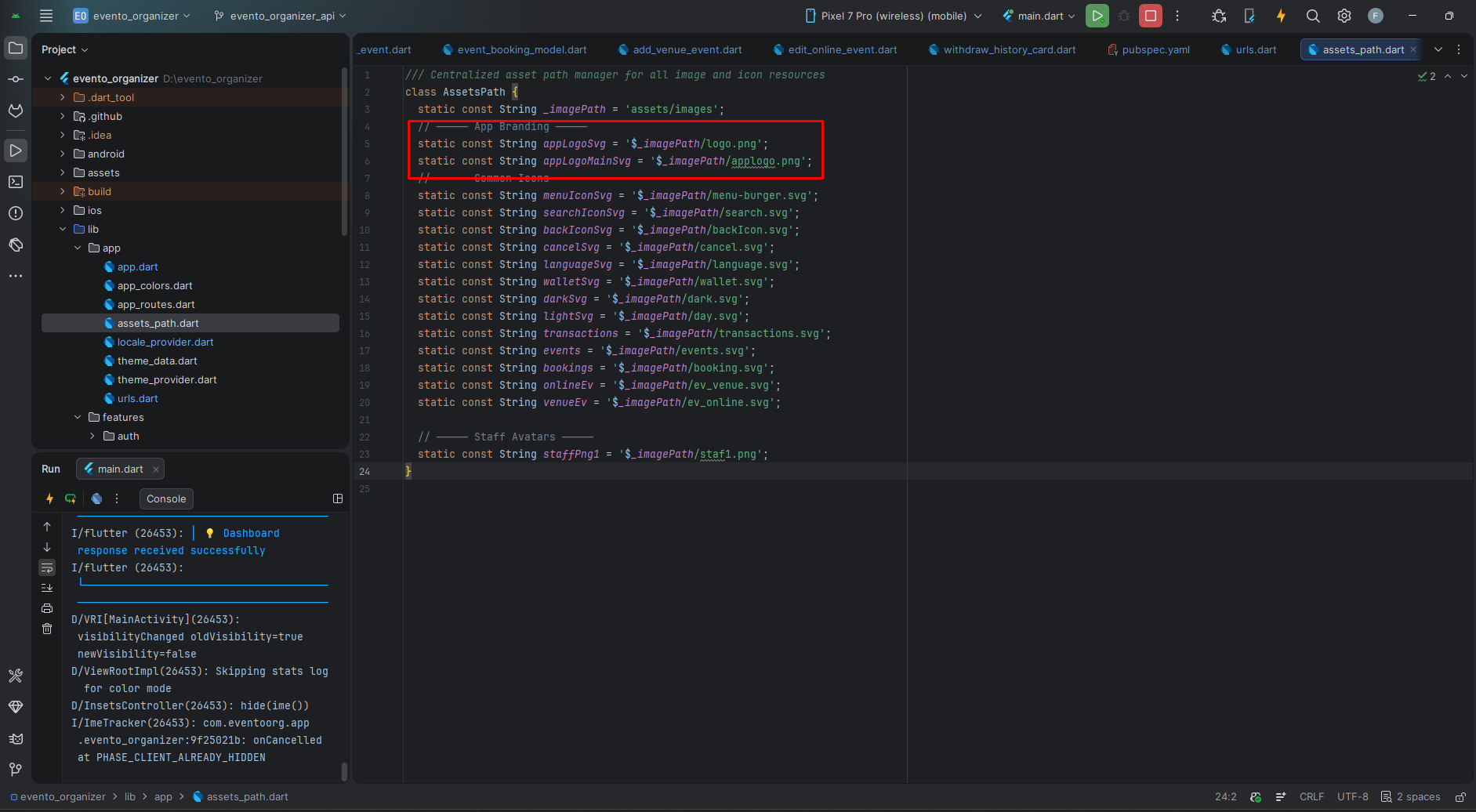
- App Logos: Defined in
AssetsPath(lib/app/assets_path.dart):assets/images/logo.png—AssetsPath.appLogoSvg(main logo)assets/images/applogo.png—AssetsPath.appLogoMainSvg(alternate/splash logo)
- Replace the PNG files with your own logos (recommended size: 1024×1024 for applogo, transparent background).
- If you rename files, update the constants in
lib/app/assets_path.dartaccordingly.
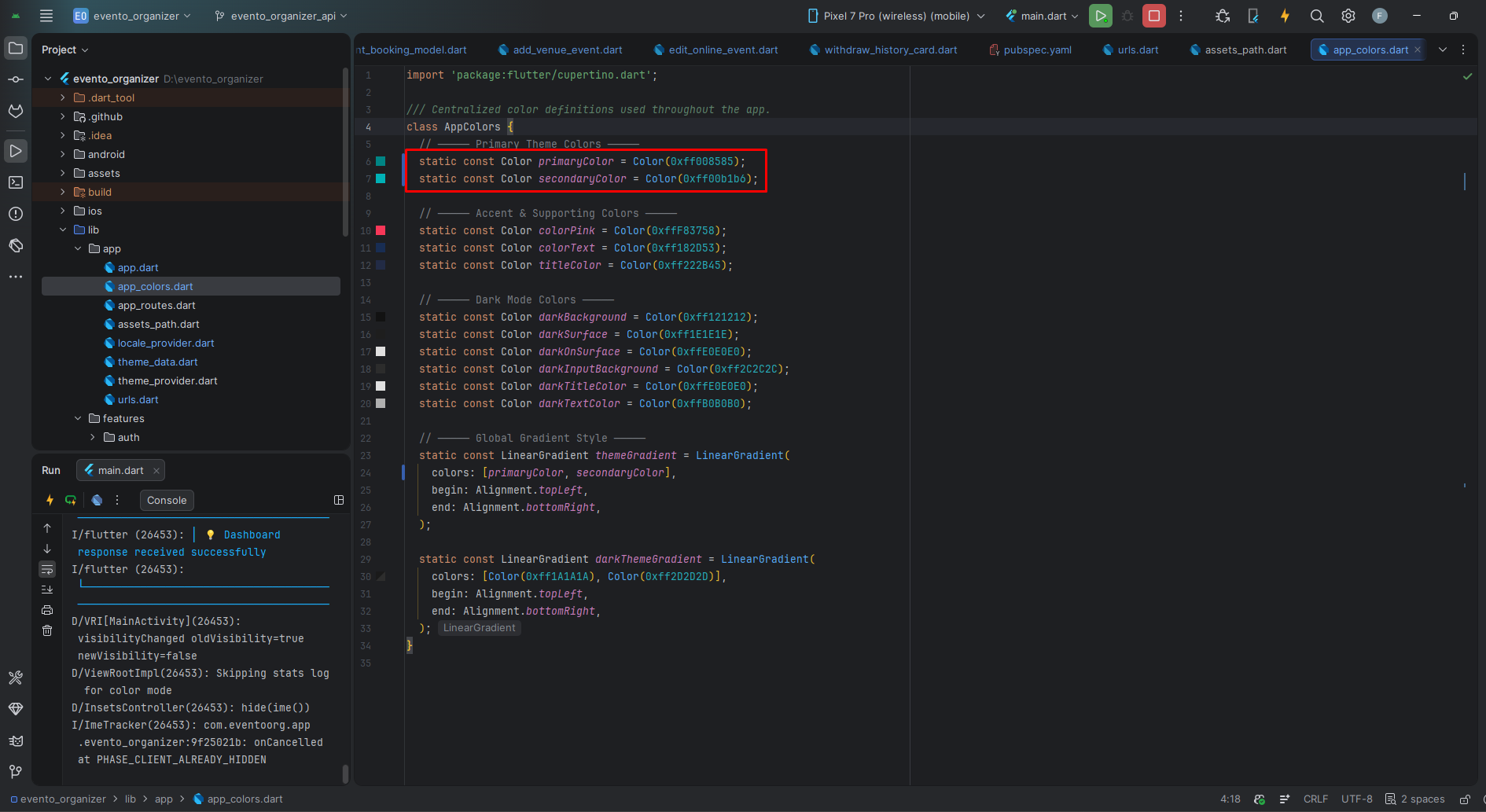
Theme Colors
All colors are defined in lib/app/app_colors.dart (class AppColors).
- Primary:
#008585—AppColors.primaryColor - Accent:
#00b1b6—AppColors.secondaryColor - Pink Accent:
#F83758—AppColors.colorPink - Text Color:
#182D53—AppColors.colorText - Title Color:
#222B45—AppColors.titleColor - Dark Background:
#121212—AppColors.darkBackground - Dark Surface:
#1E1E1E—AppColors.darkSurface - Dark On-Surface:
#E0E0E0—AppColors.darkOnSurface - Dark Input Background:
#2C2C2C—AppColors.darkInputBackground - Dark Title Color:
#E0E0E0—AppColors.darkTitleColor - Dark Text Color:
#B0B0B0—AppColors.darkTextColor
Full light/dark theme defined in lib/app/theme_data.dart (AppThemeData). Font
family: Inter — swap in pubspec.yaml fonts section and update
AppThemeData.
Localization
The app supports English (en), Arabic (ar / RTL), and
Spanish (es). Language is managed by LocaleProvider and persisted under the
app_locale key in SharedPreferences (language code only, e.g. en).
Check LocaleProvider.isRTL when layout direction matters.
Build & Run App
Run the Application:
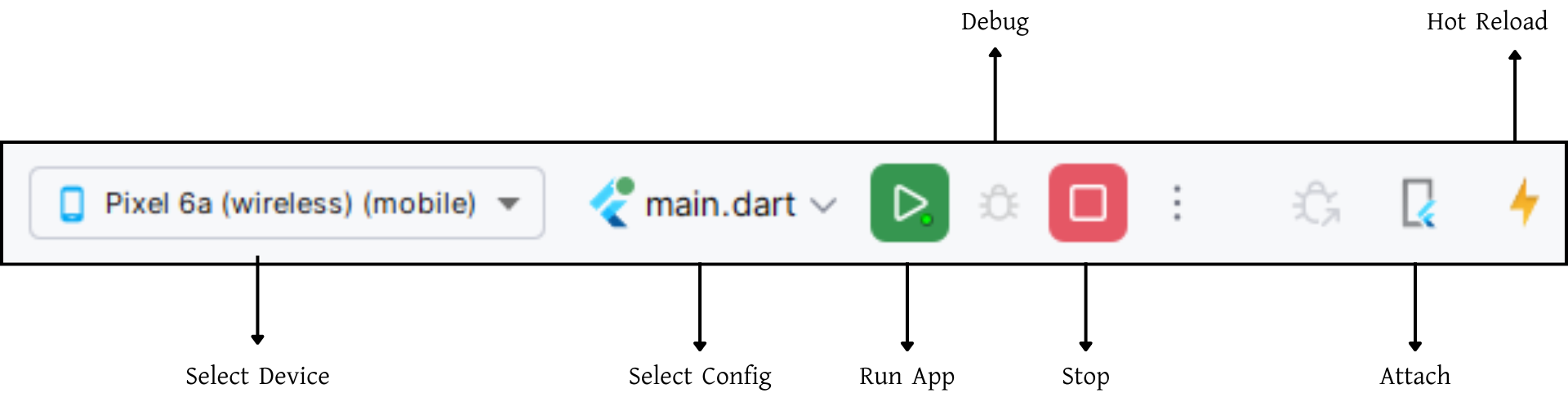
- Select an Android/iOS device in the target selector in your IDE.
- Or run from the command line:
Build Release & Publish App
1. Build Release APK
After making all changes, open the terminal, navigate to the project folder, and run:
For Play Store, use App Bundles to reduce final APK size.
Build App Bundle (recommended for Play Store):
Split APKs per ABI:
Signing the App (required for Google Play):
Generate a signing key:
Create android/key.properties:
keyPassword=your_key_password
keyAlias=key
storeFile=../app/key.jks
Update android/app/build.gradle with signing config referencing key.properties.
2. Android (Play Store)
https://flutter.dev/docs/deployment/android3. iOS (App Store)
Support
📩 For support, customization, or queries, contact us via https://kreativdev.freshdesk.com